
Pay a customer's credit back
Pay what is left of a deposit or credit note back to the customer from a cash or bank account, see every refund, and void one.
A customer's credit is money you hold for them: a deposit no invoice took, an overpayment, or a credit note for goods they returned. Usually it pays their next invoices. When they want the money back instead, record a refund.
Refund a credit
- Open the posted receipt or credit note with Credit left and choose Refund. Only people allowed to refund customers see it, usually the owner and administrators.
- Amount starts with all the credit left. Lower it to pay back only part; the rest stays as credit.
- Date is the day the money went out, never before the receipt or credit note.
- Pick how it was paid (Paid by) and Paid from: the cash or bank account the money left. Left empty, cash comes from the account set for cash and the other methods from the one set for the bank, in Account mappings.
- Add the bank's reference in Their reference, such as a transfer number, and give the Reason. The reason is required, and the owner sees it on the review list.
- Choose Refund.
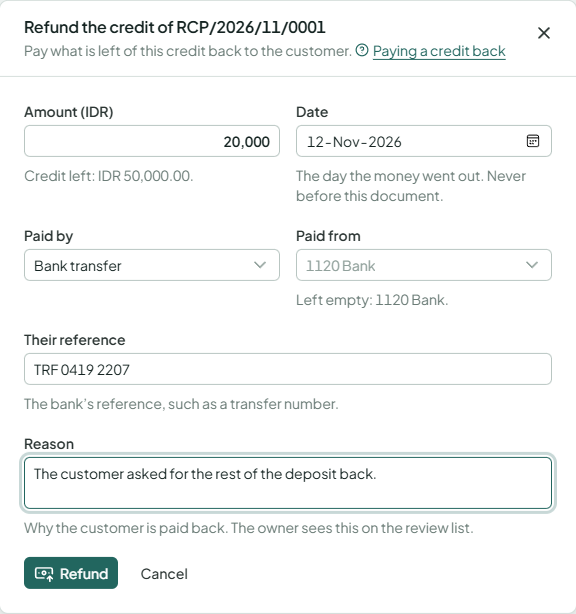
The refund posts at once. The receipt or credit note shows it under Paid back, and its Credit left goes down. Those who see the ledger find its journal: the customer's receivable against the cash or bank account. For a credit in another currency, the difference between its rate and the day's rate posts as an exchange gain or loss.
When the owner has set an approval rule for refunds, one at or above its amount isn't posted: you're told it needs approval, and someone allowed to approve it (or the owner) must agree first, never the person who asked. The owner's own go through and appear on the review list.
Every refund issues a payment voucher for the customer, numbered with your payment vouchers. Beside the refund, PDF shows it to print or download, and Send emails it to the customer or makes a share link. Where a duty stamp is due, the voucher has a box for it, as a receipt does. Voiding the refund leaves the voucher as it was issued.
See every refund
Write-offs and refunds in Sales has a Refunds tab: the refunds, newest first, with the receipt or credit note they came from, the customer, how they were paid, the payment voucher, the amount and the reason.
Void a refund
When the money didn't go out after all, such as a transfer that failed, choose Void beside the refund on the receipt, the credit note or the list. Pick the day (its own or later) and give the reason. The money is put back in the account, and the credit is open again.
A receipt or credit note with a refund can't be voided. Void the refund first.