
Run a shift
Open a shift with the cash in the drawer, pay cash in and out, close it with a blind count, and approve cash over and short.
A shift is one cashier's time at a register, from counting the drawer in the morning to counting it again at closing. Your books follow the cash all day, so at closing the count shows whether the drawer is over or short.
Opening a shift
- In Point of sale, open Registers.
- Choose Open a shift beside the register.
- Count the cash in the drawer and enter it. Enter zero if it's empty.
- Choose Open the shift. Its page opens.
If the count differs from what the last shift left, the shift page says so; the difference ends up in the variance at closing, because your books follow the cash, not the opening count.
During the shift
On the shift's page:
- Pay in records cash put into the drawer, such as change from the safe. Pick the account it came from.
- Pay out records cash taken out, such as a delivery paid at the door or cash moved to the safe. Pick the account it went to and give a reason.
- Open the drawer records the drawer opened without a sale, for change or a check, with a reason.
Each pay-in and pay-out posts a journal at once. Pay-outs and drawer openings go on the owner's review list. Paying cash in and out takes its own permission, apart from running the shift, so the person counting the cash isn't the one taking it out.
Closing a shift
- Choose Close the shift.
- Count everything in the drawer and enter it under Cash counted.
- Under Take out, enter the cash going to the safe or the bank, and where it goes. What's left stays in the drawer for the next shift.
- Add a note for the approver if something happened, and choose Close the shift.
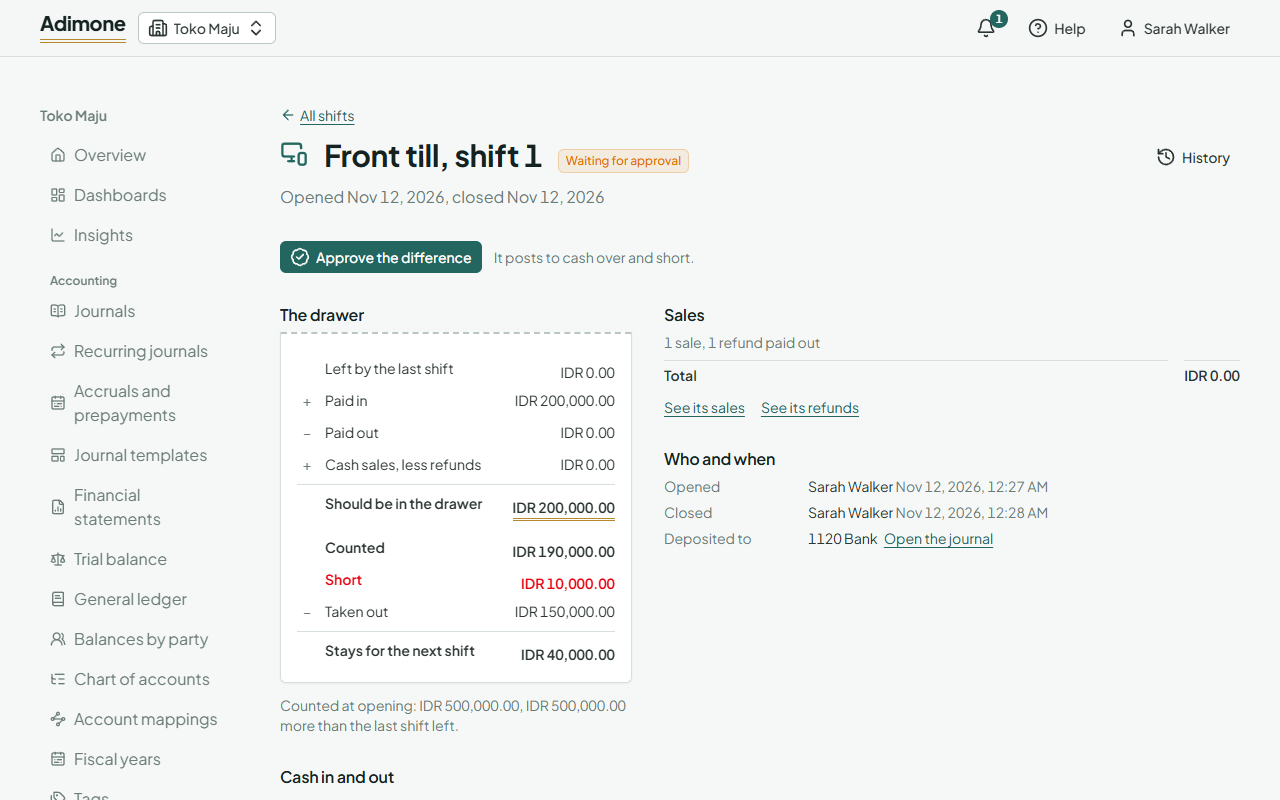
The count is blind: while the shift is open, a cashier doesn't see what the drawer should hold, so the count can't be made to match. After closing, the shift page adds the drawer up: what the last shift left, plus pay-ins, less pay-outs, plus cash sales less cash refunds, gives what should be in the drawer; against it, what was counted, and the difference. These figures are what your cash holds, so only people who see what cash accounts hold (the Owner, Administrators and the Accountant role) see them; a cashier doesn't, even after closing.
Cash over and short
When the count matches, the shift is closed. When it doesn't, it is waiting for approval:
- In Shifts, choose Waiting for approval and open the shift.
- Choose Approve the difference, pick the day it posts (the closing day or later) and say what explains it.
The difference posts to the account Cash over and short, and the drawer's account then matches the count. A difference within the register's variance tolerance posts at closing on its own, marked Within tolerance.
Approving takes its own permission, which the Owner, Administrators and the Accountant role hold. If your business has someone else check variances (When someone else must check it), whoever opened or closed the shift can't approve it.